
Why Is My iPhone Screen Flickering? Common Causes Explained
Introduction
An iPhone screen that suddenly starts flickering can be frustrating — especially when you rely on your phone for work, communication, banking, entertainment and everyday tasks.
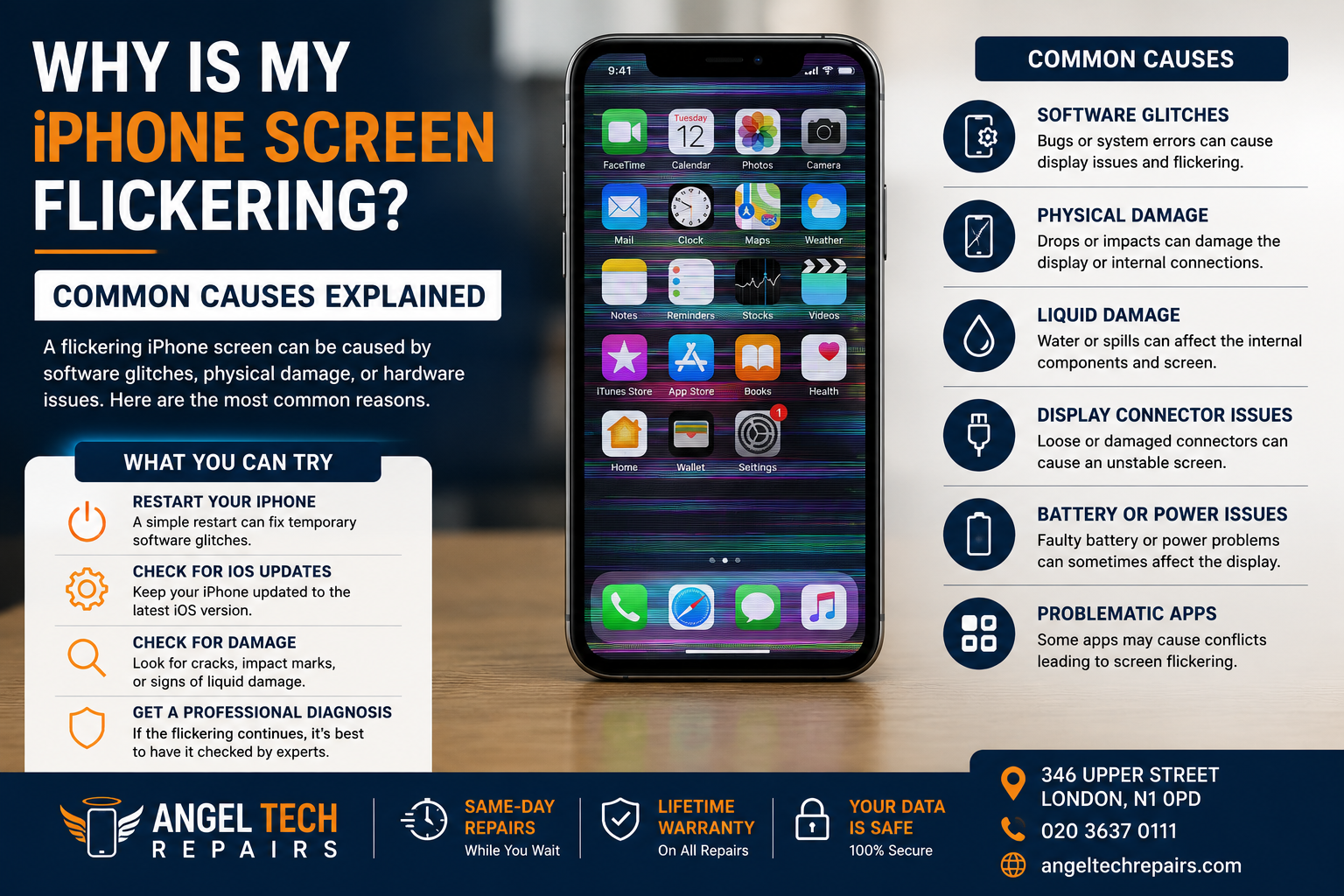
Screen flickering can appear in different ways. You might notice your display flashing, brightness changing unexpectedly, horizontal or vertical lines appearing, or parts of the screen becoming unresponsive. Sometimes the problem is caused by a simple software issue, while in other cases it can indicate a damaged screen or an underlying hardware fault.
If your iPhone screen is flickering, here are some of the most common causes and what you can do about them.
What Does iPhone Screen Flickering Look Like?
Screen flickering doesn’t always look the same.
You may experience:
- The screen flashing on and off
- Random brightness changes
- Horizontal or vertical lines
- A screen that flickers when you scroll
- Parts of the display flashing
- Green, white or other unusual colours
- Flickering after dropping the phone
- A display that becomes unstable when charging
- Touchscreen problems alongside the flickering
The cause can range from software settings to physical damage.
1. A Software Glitch
One of the simplest explanations is a temporary software problem.
Your iPhone’s display is controlled by software as well as physical components. A bug, application problem or temporary system error can occasionally cause unusual display behaviour.
Before assuming your screen needs replacing, try restarting your iPhone.
If the flickering disappears after restarting but returns later, check whether your iPhone has any available software updates.
Keeping iOS updated can help resolve known software bugs and improve the overall stability of your device.
2. Your iPhone May Have Been Dropped
If your screen started flickering after your iPhone was dropped, knocked or otherwise impacted, physical damage is a strong possibility.
Even if the glass doesn’t appear badly cracked, an impact can potentially damage components underneath the display.
You may notice other symptoms such as:
- Lines across the screen
- Dead pixels
- Unresponsive areas
- Random colours
- Touchscreen problems
- Flickering that gets worse over time
If the problem began immediately after an accident, professional inspection is recommended.
3. A Damaged or Faulty Display
The display itself can develop a fault.
Screens contain multiple components that work together to produce the image you see. Damage to the display assembly can result in flickering, lines, discolouration or intermittent operation.
If restarting your iPhone and checking the software doesn’t solve the problem, the display may need professional diagnosis.
Angel Tech Repairs provides iPhone screen repair and lists screen replacement among its smartphone repair services. The business also advertises same-day and while-you-wait repairs for many common faults.
4. Water or Liquid Damage
Liquid exposure is another possible cause of screen problems.
Even if your iPhone continues working after coming into contact with water, internal components can potentially be affected.
Liquid damage may cause:
- Screen flickering
- Touchscreen problems
- Charging issues
- Random shutdowns
- Speaker or microphone problems
- Unusual display colours
If your iPhone has been exposed to liquid and the screen begins flickering, avoid repeatedly charging or using the device and consider getting it professionally assessed.
Angel Tech Repairs offers liquid-damage repair alongside other smartphone repair services.
5. Display Connector Problems
The display needs a reliable connection to the rest of the phone.
If a connector has become loose or damaged, the screen may behave intermittently. This can sometimes happen following an impact or previous repair.
A display connector problem isn’t something you should attempt to fix without the correct tools and technical experience. Opening an iPhone incorrectly can cause further damage.
A professional technician can inspect the internal connections and determine whether the issue is with the screen, connector or another component.
6. A Problem With the Battery or Power Supply
In some situations, unusual screen behaviour can be associated with power-related problems.
If your iPhone is experiencing flickering alongside:
- Rapid battery drain
- Unexpected shutdowns
- Overheating
- Charging problems
- Performance issues
it may be worth having the battery and other internal components checked.
Angel Tech Repairs provides iPhone battery repair and replacement services, along with diagnostic services to help identify device faults.
7. An App Could Be Causing the Problem
If the flickering only occurs when you use a particular application, the app itself could be contributing to the issue.
Try closing the application and checking whether the flickering continues elsewhere on the phone.
If the issue only happens inside one app, check for an update or reinstall the application.
However, if the entire display continues to flicker across different apps and menus, the problem may be more likely to involve iOS or the phone’s hardware.
8. Screen Brightness and Display Settings
Certain display settings can sometimes make flickering more noticeable.
Try adjusting the brightness and checking whether features such as automatic brightness are affecting what you see.
You can also test the phone under different lighting conditions.
If the display continues flickering regardless of brightness or settings, it’s worth investigating further rather than assuming it is simply a brightness issue.
What Should You Do If Your iPhone Screen Keeps Flickering?
Start with the simple checks:
Step 1: Restart Your iPhone
A restart can resolve temporary software glitches.
Step 2: Check for iOS Updates
Make sure your iPhone is running the latest available software version for your device.
Step 3: Check for Physical Damage
Look carefully for cracks, dents or signs of impact.
Step 4: Think About Recent Liquid Exposure
If the phone has recently been exposed to water or another liquid, mention this when seeking professional help.
Step 5: Back Up Your Data
If your iPhone is still usable, back up important photos, contacts, documents and other data.
Step 6: Get a Professional Diagnosis
If the flickering continues, professional diagnosis can determine whether you need a screen replacement or another type of repair.
Can a Flickering iPhone Screen Be Repaired?
In many cases, yes.
The appropriate solution depends entirely on what’s causing the problem.
A software issue may require troubleshooting rather than a hardware repair. A damaged display, however, may require screen replacement. Liquid damage or a logic-board fault may require more specialised repair work.
Angel Tech Repairs offers diagnostics as well as screen, battery, liquid-damage and logic-board repairs. Its listed services cover iPhones and other smartphones, tablets and computers.
Where Can You Get an iPhone Screen Repaired in Angel, London?
If you’re looking for iPhone screen repair in Angel or Islington, Angel Tech Repairs is located at 346 Upper Street, London, N1 0PD.
The business advertises same-day service and says that many common device faults can be repaired within around 30 minutes, although the actual repair time will depend on the device and the problem.
Angel Tech Repairs also states that it provides a lifetime warranty on repairs and focuses on keeping customers’ private data secure.
Before visiting, it’s a good idea to contact the repair shop with your iPhone model and a description of the flickering problem. This can help the technician understand the likely issue and advise you on the next step.
Final Thoughts
An iPhone screen that flickers shouldn’t necessarily be ignored.
The problem could be something relatively simple, such as a temporary software glitch, but persistent flickering can also indicate display damage, liquid exposure, a connector issue or another hardware fault.
If restarting your iPhone and checking the software doesn’t solve the problem — particularly if the flickering started after a drop or liquid exposure — professional diagnosis is the safest way to identify the cause.
For customers in Angel and Islington, Angel Tech Repairs offers iPhone screen repairs, diagnostics and other smartphone repair services, with same-day service available for many common faults.
Need help with a flickering iPhone screen? Visit Angel Tech Repairs at 346 Upper Street, London, N1 0PD, or contact the team to discuss your repair.